Volcengine ADK
工具
自定义工具
当内置工具无法满足业务需求时,你可以把任意 Python 函数封装成自定义工具,扩展智能体的能力。本页介绍三种形式:普通入参函数、携带运行时上下文的函数,以及长时运行任务。
普通入参函数
普通入参函数是最基础的自定义工具:定义一个函数、写好类型注解与 Docstring,再注册到 Agent 即可。Agent 会根据函数签名与 Docstring 决定何时调用、如何传参。
下面用一个计算器演示。注意 divide 分支:除零时返回 status: "error" 且不带 result,与其他分支的 status: "success" 保持一致。
import asyncio
from typing import Any, Dict

from google.adk.tools.tool_context import ToolContext
from veadk import Agent, Runner


def calculator(
    a: float, b: float, operation: str, tool_context: ToolContext
) -> Dict[str, Any]:
    """A simple calculator that performs a basic arithmetic operation.

    Args:
        a (float): The first operand.
        b (float): The second operand.
        operation (str): One of "add", "subtract", "multiply", "divide".

    Returns:
        Dict[str, Any]: On success, contains "result", "operation", and
        "status" == "success". On failure (unsupported operation or division
        by zero), contains "status" == "error" and a "message".
    """
    if operation == "add":
        return {"result": a + b, "operation": "+", "status": "success"}
    if operation == "subtract":
        return {"result": a - b, "operation": "-", "status": "success"}
    if operation == "multiply":
        return {"result": a * b, "operation": "*", "status": "success"}
    if operation == "divide":
        if b == 0:
            return {"status": "error", "message": "Divisor cannot be zero."}
        return {"result": a / b, "operation": "/", "status": "success"}
    return {"status": "error", "message": f"Unsupported operation: {operation}"}


agent = Agent(
    name="computing_agent",
    model_name="doubao-seed-1-8-251228",
    instruction="Use the `calculator` tool to perform the calculation the user asks for.",
    tools=[calculator],
)
runner = Runner(agent=agent)

response = asyncio.run(runner.run("Add 2 and 3"))
print(response)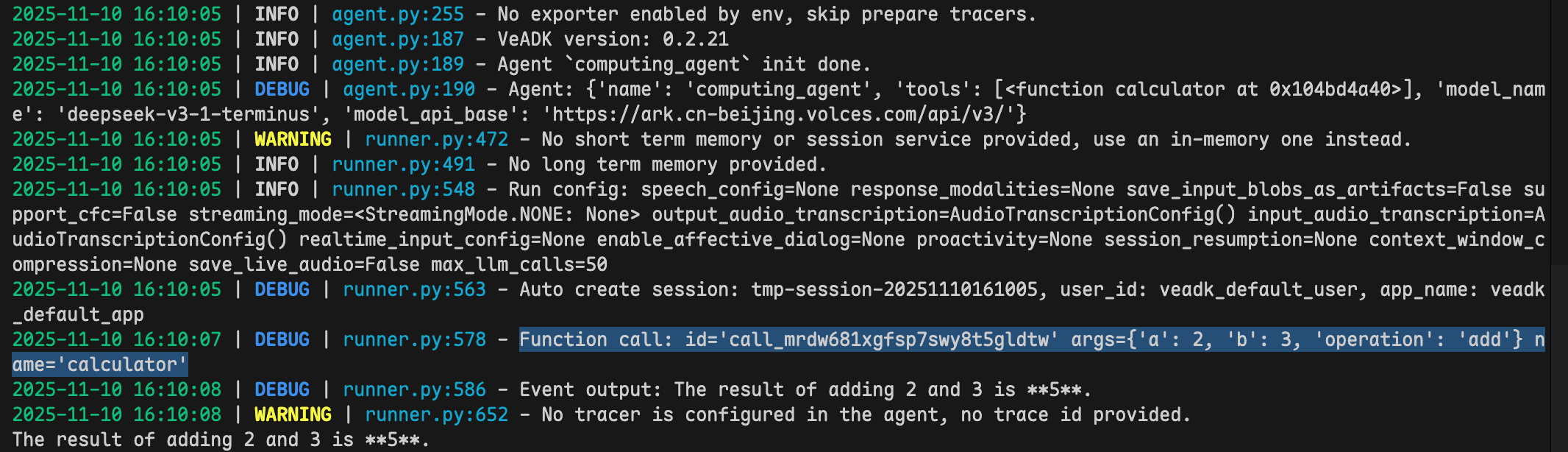
携带运行时上下文的函数
在工具函数中加入一个 tool_context: ToolContext 参数,就能访问智能体的运行时上下文——会话 ID、用户身份、当前 Agent 等。框架会自动注入该参数,模型不会、也不需要为它传值。
import asyncio

from google.adk.tools.tool_context import ToolContext
from veadk import Agent, Runner


def message_checker(user_message: str, tool_context: ToolContext) -> str:
    """Check a user message and return it normalized.

    Args:
        user_message (str): The user message to check.

    Returns:
        str: The checked message.
    """
    print(f"user_message: {user_message}")
    print(f"current agent: {tool_context._invocation_context.agent.name}")
    print(f"app_name: {tool_context._invocation_context.app_name}")
    print(f"user_id: {tool_context._invocation_context.user_id}")
    print(f"session_id: {tool_context._invocation_context.session.id}")

    return f"Checked message: {user_message.upper()}"


agent = Agent(
    name="context_agent",
    model_name="doubao-seed-1-8-251228",
    instruction="Use message_checker to check the user message, then show the checked result.",
    tools=[message_checker],
)
runner = Runner(agent=agent)

response = asyncio.run(runner.run("Hello world!"))
print(response)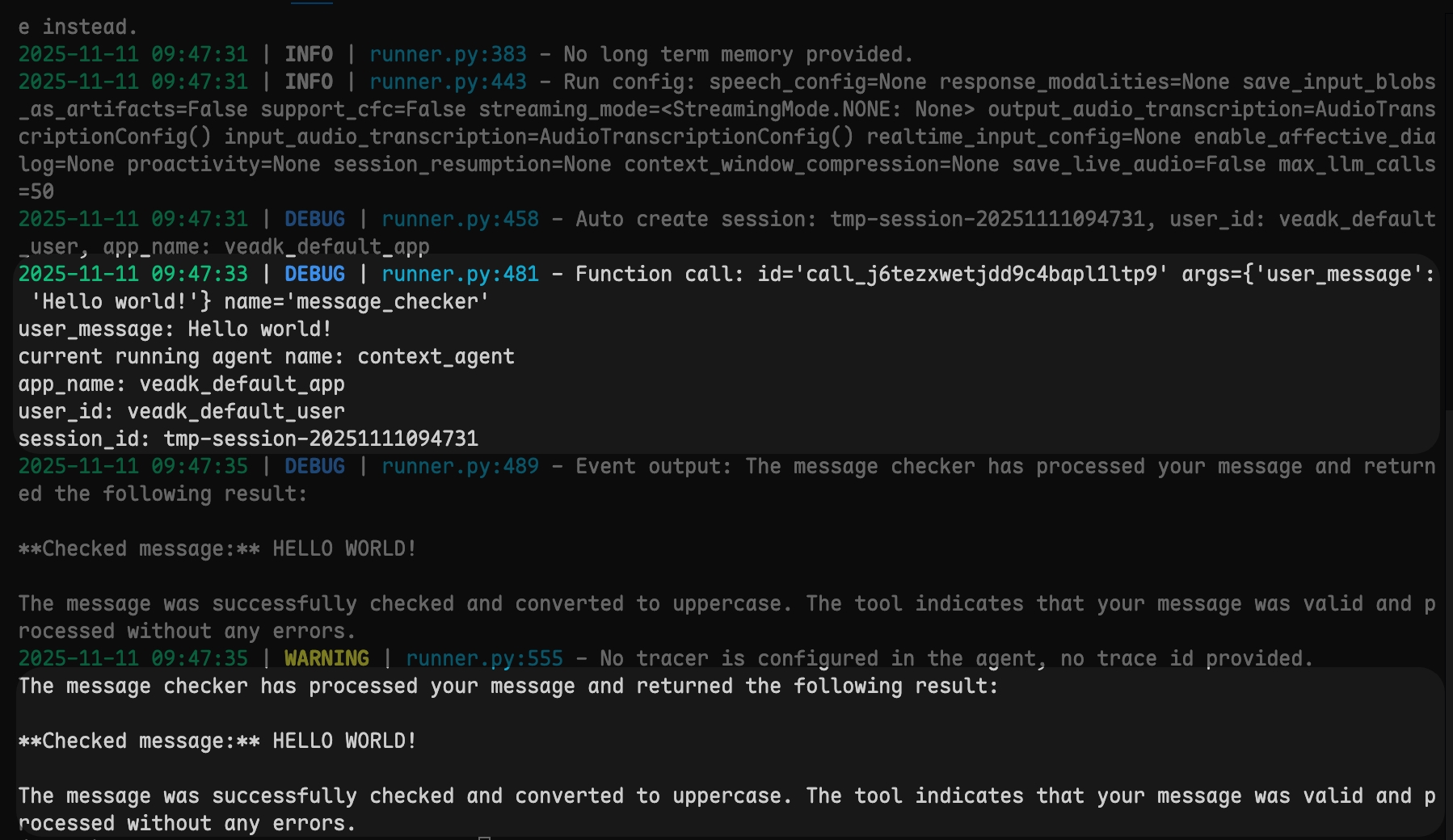
工具函数因此可以访问会话 ID、用户身份、当前执行的 Agent 等信息,从而做出更智能的决策。
长时运行任务
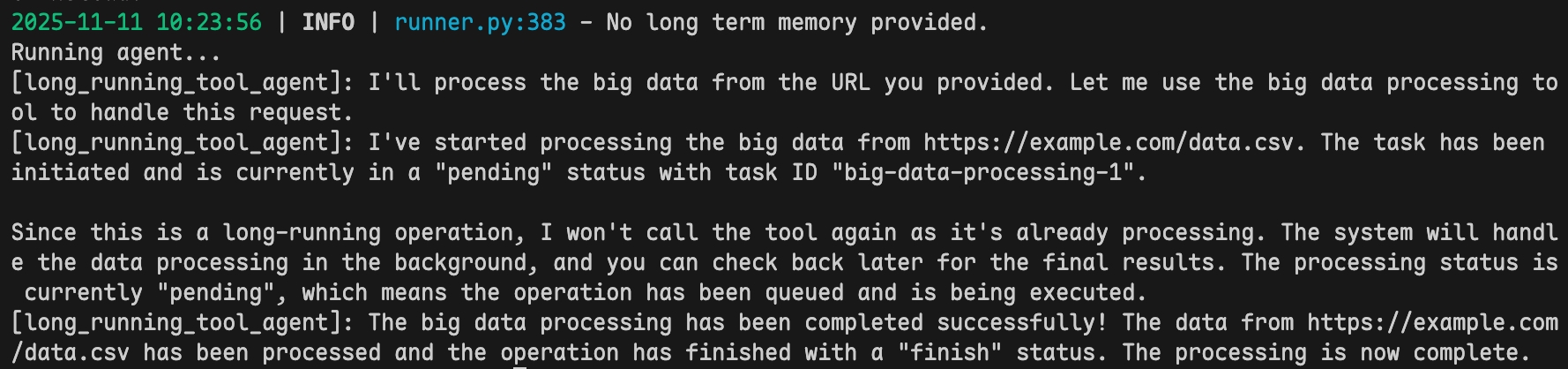
长时运行任务适用于耗时或异步的操作(大规模计算、数据分析、批处理等)。用 LongRunningFunctionTool 包装函数:工具先返回一个 pending 状态与任务 ID,应用在后台推进任务,再把最终结果回填给 Agent。
下面是一个完整可运行的示例:工具返回 pending,运行循环捕获 long-running 调用,随后用 FunctionResponse 回填 finish 状态,让 Agent 给出最终回复。
import asyncio
from typing import Any

from google.adk.events import Event
from google.adk.tools.long_running_tool import LongRunningFunctionTool
from google.genai.types import Content, FunctionCall, FunctionResponse, Part
from veadk import Agent, Runner

APP_NAME = "long_running_tool_app"
USER_ID = "long_running_tool_user"
SESSION_ID = "long_running_tool_session"


def big_data_processing(data_url: str) -> dict[str, Any]:
    """Start processing big data located at a URL.

    Args:
        data_url (str): The URL of the big data to process.

    Returns:
        dict[str, Any]: The initial task state, with "status" == "pending",
        the "data-url", and a "task-id" to track the job.
    """
    # Kick off the long-running job and return its handle immediately.
    return {
        "status": "pending",
        "data-url": data_url,
        "task-id": "big-data-processing-1",
    }


long_running_tool = LongRunningFunctionTool(func=big_data_processing)

agent = Agent(
    name="long_running_tool_agent",
    model_name="doubao-seed-1-8-251228",
    instruction="Use long_running_tool to process big data.",
    tools=[long_running_tool],
)
runner = Runner(agent=agent, app_name=APP_NAME)


def get_long_running_call(event: Event) -> FunctionCall | None:
    """Return the long-running function call carried by an event, if any."""
    if not event.long_running_tool_ids or not event.content or not event.content.parts:
        return None
    for part in event.content.parts:
        if (
            part.function_call
            and part.function_call.id in event.long_running_tool_ids
        ):
            return part.function_call
    return None


def get_function_response(
    event: Event, function_call_id: str
) -> FunctionResponse | None:
    """Return the function response matching a given call id, if any."""
    if not event.content or not event.content.parts:
        return None
    for part in event.content.parts:
        if (
            part.function_response
            and part.function_response.id == function_call_id
        ):
            return part.function_response
    return None


async def main():
    # Create the session before running.
    session = await runner.short_term_memory.create_session(
        app_name=APP_NAME, user_id=USER_ID, session_id=SESSION_ID
    )

    query = "Process the big data from https://example.com/data.csv"
    content = Content(role="user", parts=[Part(text=query)])

    print("Running agent...")
    long_running_call = None
    long_running_response = None
    async for event in runner.run_async(
        session_id=session.id, user_id=USER_ID, new_message=content
    ):
        if long_running_call is None:
            long_running_call = get_long_running_call(event)
        elif long_running_response is None:
            long_running_response = get_function_response(event, long_running_call.id)
        if event.content and event.content.parts:
            if text := "".join(part.text or "" for part in event.content.parts):
                print(f"[{event.author}]: {text}")

    # The task finished in the background; send the final result back to the agent.
    if long_running_response is not None:
        updated = long_running_response.model_copy(deep=True)
        updated.response = {"status": "finish"}
        async for event in runner.run_async(
            session_id=session.id,
            user_id=USER_ID,
            new_message=Content(
                role="user", parts=[Part(function_response=updated)]
            ),
        ):
            if event.content and event.content.parts:
                if text := "".join(part.text or "" for part in event.content.parts):
                    print(f"[{event.author}]: {text}")


if __name__ == "__main__":
    asyncio.run(main())